How it works
Manage the project where the work is.
Each Jira project gets a Tollgate tab with a dashboard, a plan and three registers. You keep them current through the week. On meeting day you open the dashboard.
Each Jira project gets a Tollgate tab with a dashboard, a plan and three registers. You keep them current through the week. On meeting day you open the dashboard.
Developers have boards. Testers have queues. The project manager answers for time, cost, scope, risk and decisions, and has nowhere in Jira to keep them. So the plan lives in a spreadsheet, the risks in a document, and every reporting cycle starts with copying them into a pack.
Tollgate gives that work a home in the project. What you keep current through the week is what you present.
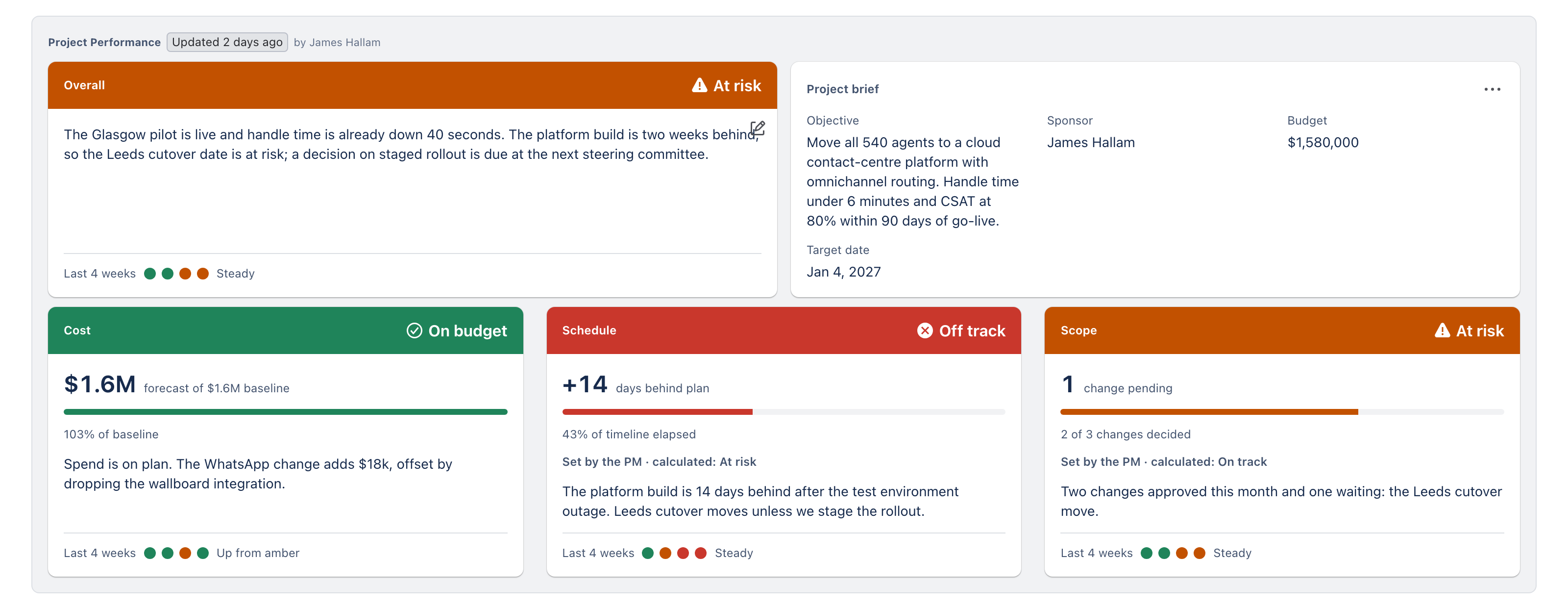
The tab opens on the Dashboard, headed Project Performance. You set the status because you know things the numbers don't. The calculated status sits beside it so everyone can see when the two differ, and you can say why.
In your words.
A status and your key message, written by you.
The facts of the project.
Objective, sponsor, budget and target date.
Set by you, checked by the plan.
Three cards. On each you set the status and write the commentary. Tollgate shows its own calculated status next to yours. Four dots show the last four reporting periods.
A work package is a slice of the project with an owner. Each has start and end dates, a budget, an actual, a forecast and a percentage complete. Update them as the work moves. The dashboard, the timeline and the S-curve all read from them, so there is one set of numbers.
Work packages are Tollgate's own records, linked to the Jira issues that do the work. You add no issue types and change no workflows.
Start and end for each work package, drawn straight onto the timeline.
What was planned, what has been spent and what you expect to spend. The S-curve reads from these.
How far the work has got, so the Schedule card and the S-curve can compare plan with progress.
The registers sit under the same project page as the dashboard, so the answer to a follow-up is one click away.

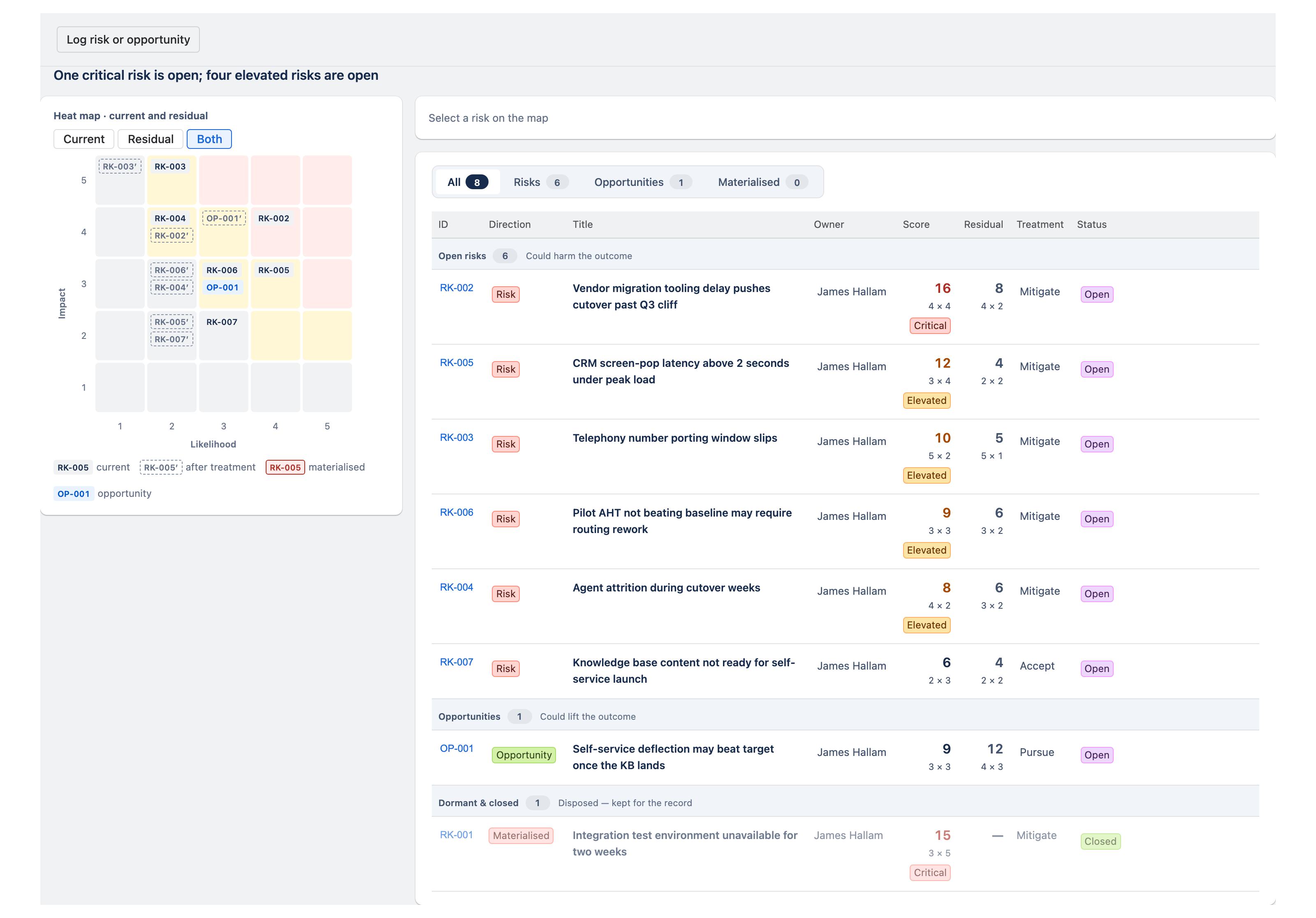
Each rated, owned and ranked. The open ones are what the steering committee asks about.
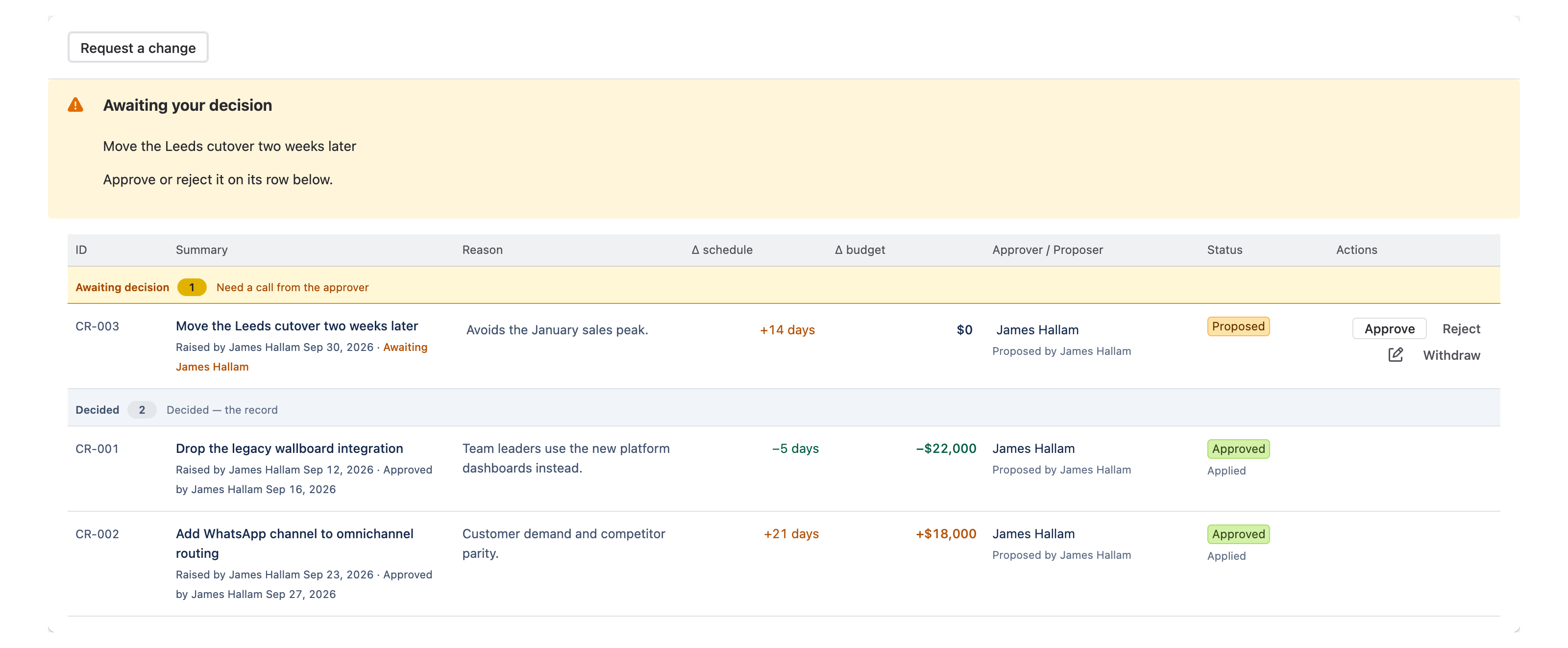
What was decided, by whom and when. The log is where you find out what you agreed about that change in March.

Scope changes recorded against the plan, with their effect on cost and schedule.
Timeline. Your work packages on a Gantt, drawn from their dates. Slippage shows at a glance.
S-curve. With a budget, it plots earned value: what you planned to have done, what you have done and what you have spent. Without a budget, it plots planned against actual percentage complete. The same curve works for a funded project and for one with no money attached.
Cost is measured against the plan, and setting a baseline needs no approval.

If the dashboard is current, the meeting is ready.
Update the project for five or ten minutes at a time. When the steering committee meets, open the Tollgate tab on the screen.
The status cards give the headline and your commentary gives the reasons. When someone asks about the scope change, the register is a click away.
There is no pack to build, no export and nothing to reconcile on the morning of the meeting.
Tollgate Portfolio is a separate page under Jira's Apps menu. Choose a Jira Plan and it rolls up every project in it: one row per project with health, budget against forecast and the variance, worst first. Tiles above the table show portfolio budget, health and what needs attention. Click a tile and the table narrows to the projects behind it. Each row reads the same dashboard its project manager keeps current, so there is no second set of numbers. Plans is a Jira Premium feature. On a site without it the portfolio stays empty, and each project still runs in full.

Tollgate is a Forge app that runs on Atlassian: no external servers, no external database. It is a tab on each Jira project, with data stored per project in Atlassian's infrastructure. New projects open in Standard mode with nothing to configure first. Ask Tollgate, a Rovo agent, answers questions about the project from its current data: open risks, late work packages, recent decisions. It runs on Atlassian Rovo, which Atlassian provides on Jira Premium and Enterprise.
Sprint velocity, burndown and ticket metrics stay in Jira. Tollgate leaves them alone.
Tollgate tracks budget against the plan. Your finance system stays the system of record.
New projects open ready to use. No new issue types, no changes to your workflows.
Resource and capacity planning stay in the tools built for them.

Thirty minutes on a call is quicker than another cycle of building the pack. Tollgate is free for up to 10 users on the Atlassian Marketplace.
No obligation. If Tollgate does not suit how you run projects, we will say so on the call.