Investment governance software inside Jira Cloud

Tollgate holds the business case, the gate decisions, and the expected payoff of each investment in one live dashboard inside Jira Cloud. Sponsors, PMO leads, and transformation directors present from that dashboard in the steering committee.

Runs on Atlassian infrastructure, with no Softwired server in the path

Built by Softwired, with 20 years of governance work on seven- and eight-figure programs

Where steering committee reporting breaks down

When a steering committee runs from slides, the RAG status stays amber and nobody in the room can say whether the investment is still on track for what it was funded to deliver.


Each gap means the picture is assembled by hand before every meeting and breaks at the first hard follow-up question.
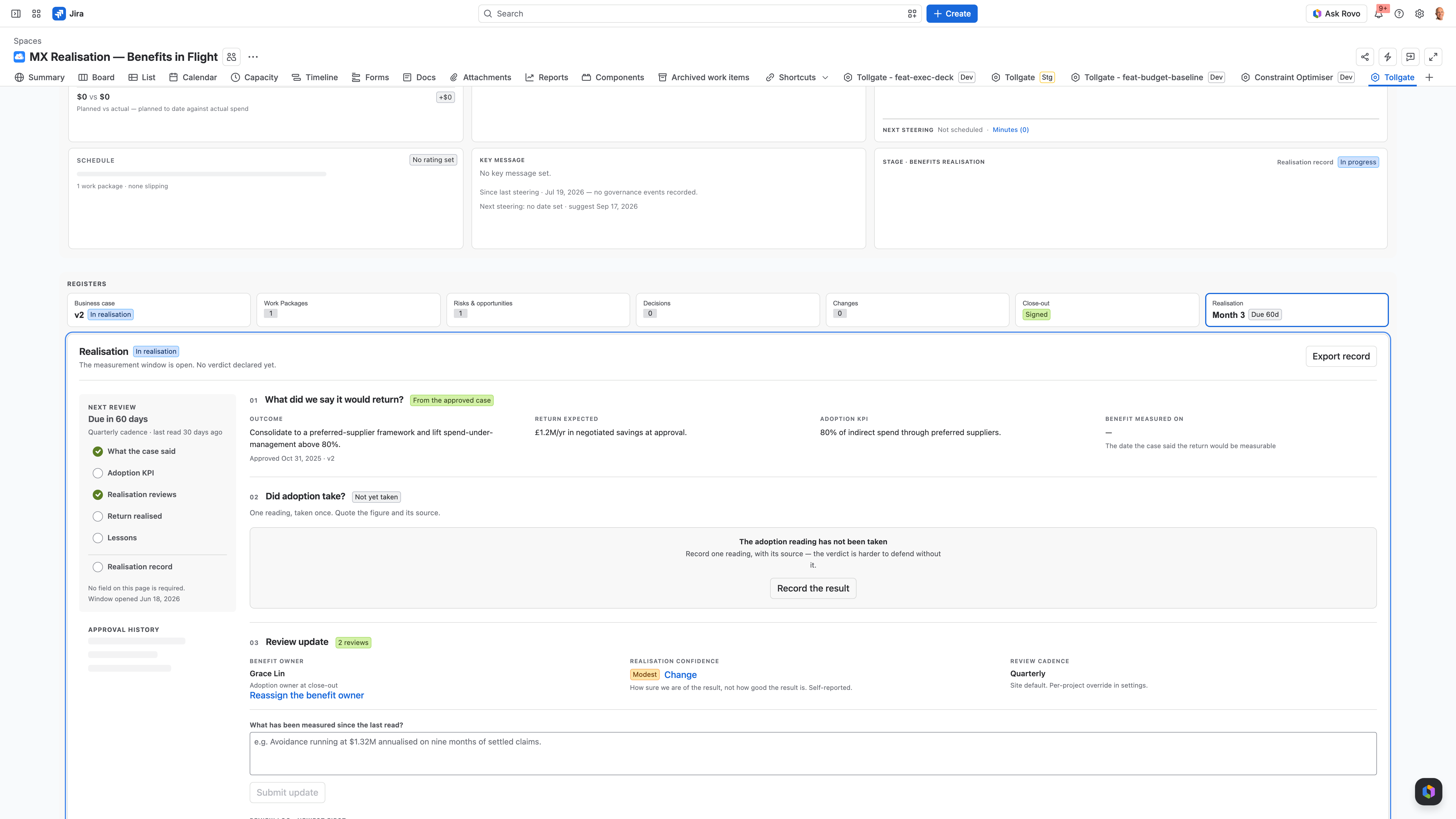
Tollgate Realisation verdict — the outcome-confidence record captured at project close

Above and below the line: where Jira ends and Tollgate starts

  • Above the line sit the people answerable for the money: sponsors, transformation leads, portfolio managers, and the steering committees they report to. Below it sits delivery.

  • Jira tracks delivery, which sits below the line. Tollgate tracks the investment above it. It reads delivery state from Jira and reports in the sponsor’s terms: business case, work packages, gates, and a record of every decision you can stand behind.

  • Delivery teams answer “are we building it well?” Sponsors have to answer “are we on track for the payoff we funded?”, and story points can’t help them with that.

  • It sits next to the work, behind the same login and inside the same security boundary, so nobody has a new tool to learn.

How it works

Commit, Run, and Realise: the three acts of an investment

Tollgate follows each investment through six stages in three acts, from the decision to fund it to the sponsor’s verdict on whether the benefits landed. Gate states are advisory and never block the work.

01

Commit

In Discovery you write the investment thesis and build the business case. The financial case works out NPV, IRR, and payback from the cashflows you enter, and holds them as the targets you commit to. In Approval the sponsor makes the call at the gate and the decision goes on the record.

02

Run

Initiation and Delivery run on four registers: work packages, risks and opportunities, decisions, and changes. Tollgate works out separate cost, schedule, scope, and risk RAG statuses from those registers each time they change, so nobody picks those colours by hand.

03

Realise

Close-out and Benefits Realisation finish the lifecycle. The sponsor records the return they expected next to the return they got, and Tollgate declines to calculate a live realised-ROI variance, so the verdict is the sponsor’s call. Every investment rolls up into Tollgate Portfolio.

Presenting a steering committee from the live dashboard

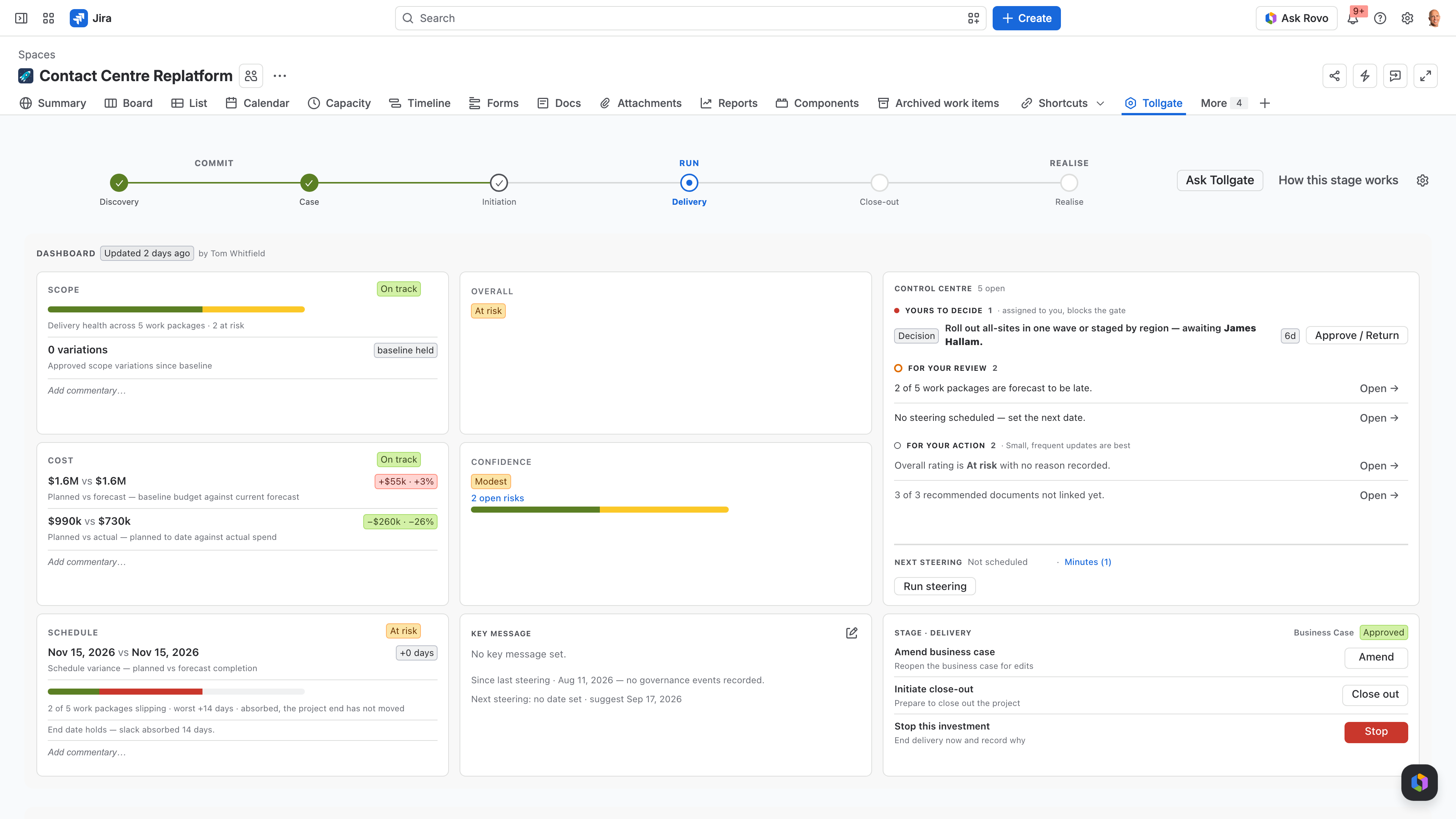
The project manager keeps the case file current through the week with small updates. When the steering committee meets, the dashboard goes on the projector, so nobody builds a pack. If someone asks a follow-up that has no slide, such as the budget impact of a Q2 change or the work packages it put at risk, you open the register or put the question to Ask Tollgate in plain language, and you answer from current data while the room is still there.

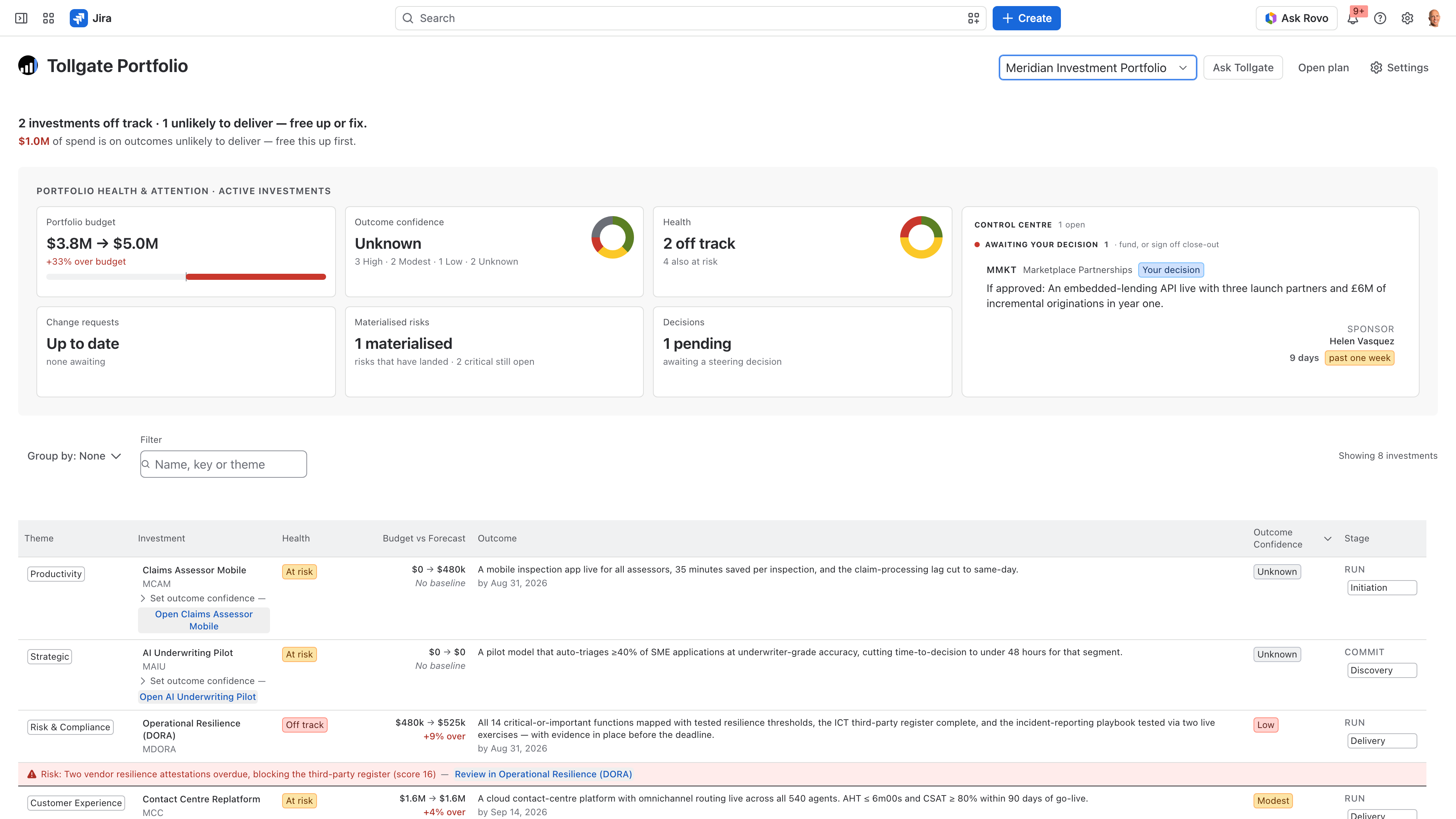
Tollgate portfolio roll-up in Jira — investments by theme with health, budget and outcome confidence
Tollgate Investment Health dashboard in Jira — RAG cards for cost, schedule, scope and risk with budget baseline, forecast and actual
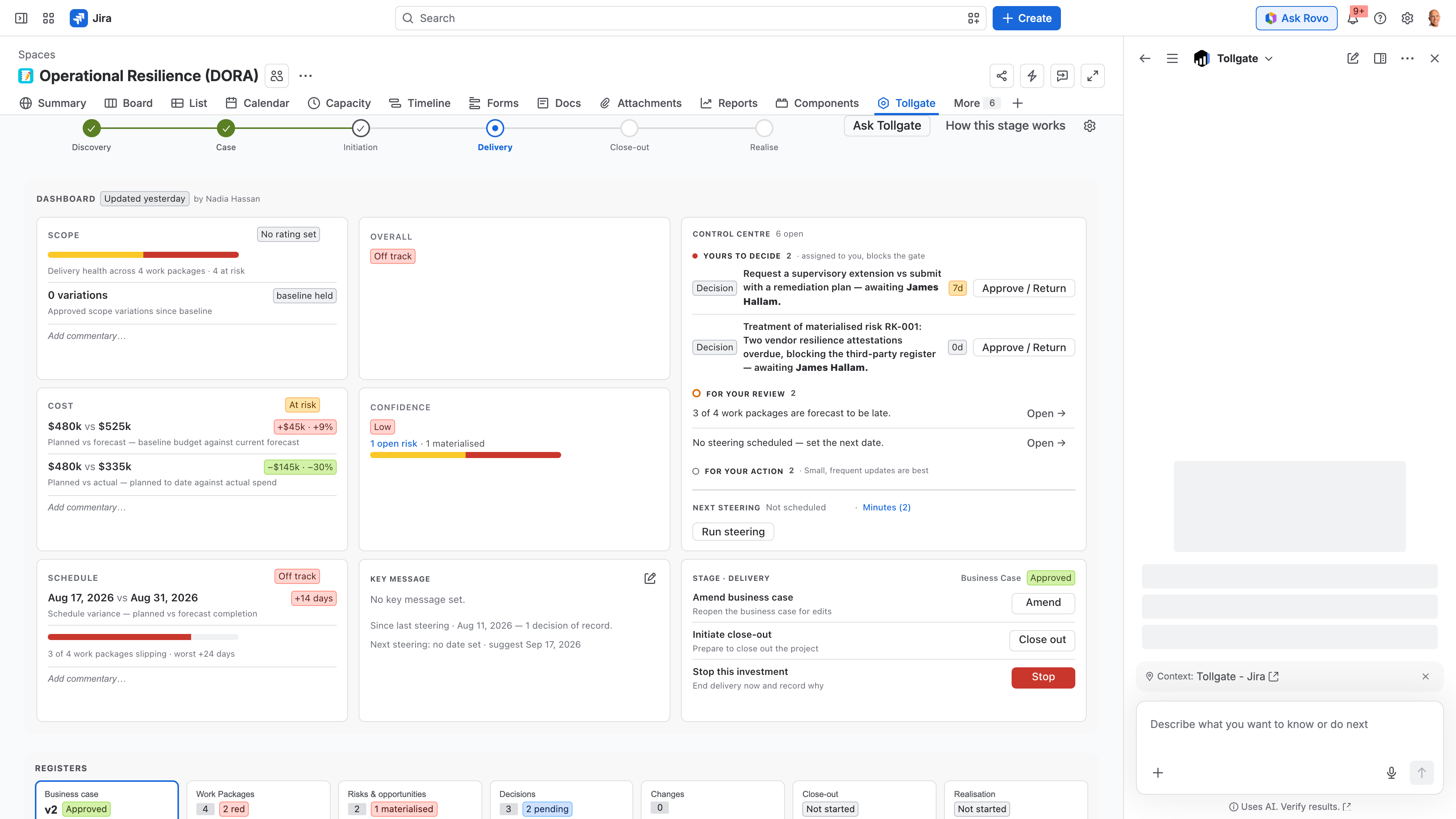
Ask Tollgate answering a governance question inside Jira — the Rovo agent reading the project's case file, decisions and risks
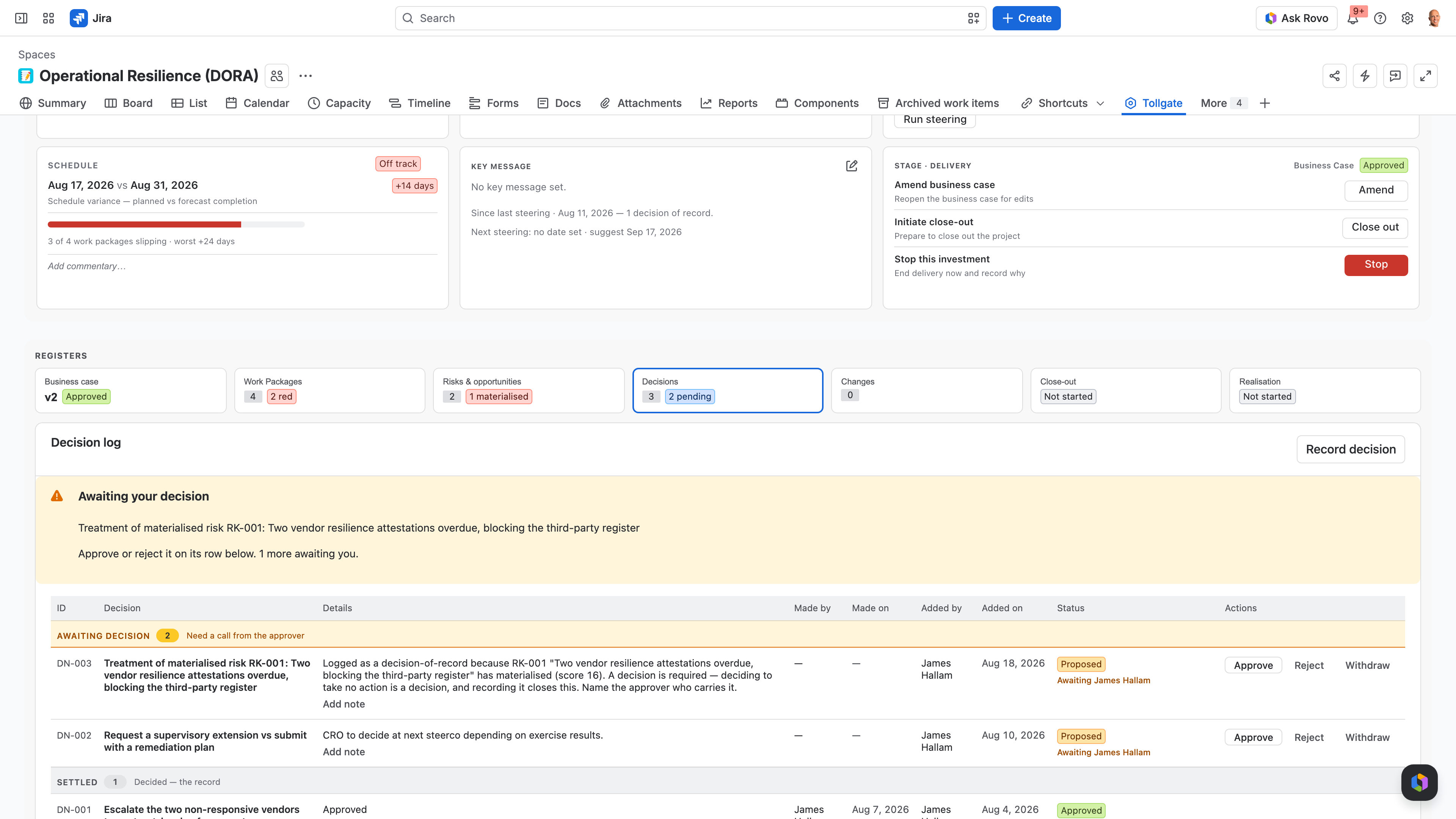
Tollgate decisions log for the Contact Centre Replatform in Jira — proposed and approved governance decisions with named approvers
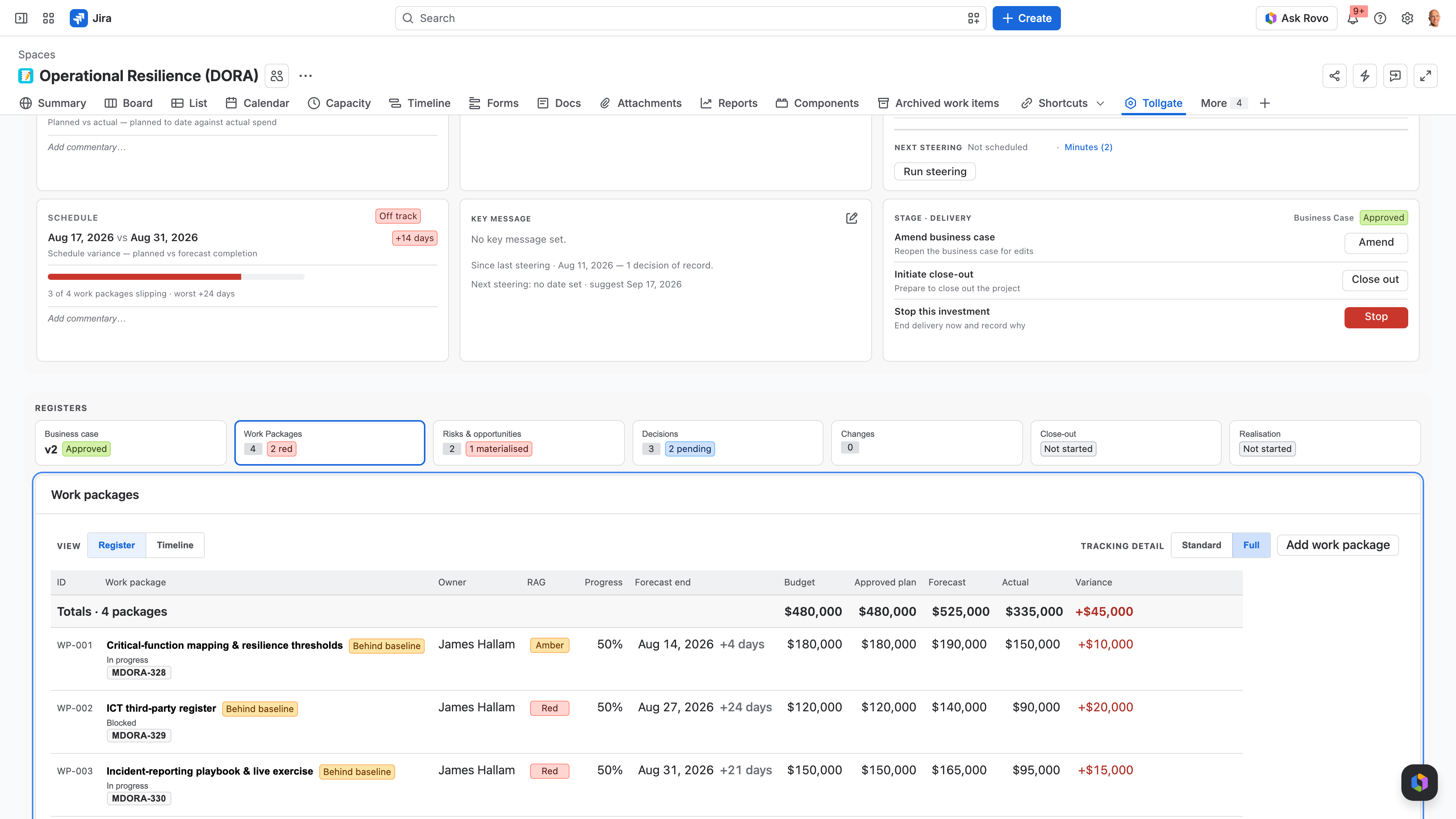
Tollgate Work Packages register in Jira — baseline, actual and forecast budget with RAG per work package

The six Tollgate surfaces

Each surface shows the part of a record needed for governance and leaves the rest to Jira and your finance system.

Business case

The reason the investment exists, with a Draft → Submitted → Approved lifecycle and a financial case that works out NPV, IRR, and payback from entered cashflows.

Work packages

Slices of scope with an owner, a budget, and a schedule. They’re the unit a sponsor thinks in, and each one links to the Jira epics underneath.

Risks and opportunities

Risks, opportunities, and materialised items in one list, ranked by impact and likelihood.

Decisions & changes

An append-only decision log and change control with separation of duties. When someone asks what was approved, by whom and when, you can show them.

Investment Health

The dashboard you present from. It shows RAG status cards, pending changes, top risks, recent decisions, and a flag when the picture goes stale.

Tollgate Portfolio and Ask Tollgate

Tollgate Portfolio shows every investment in one view, grouped by theme. Ask Tollgate is a Rovo agent that answers plain-language questions from live data through read-only actions and makes no external AI calls. It needs Jira Premium or Enterprise.

Who Tollgate is for, and who it is not for

Built for
  • PMO and portfolio leads who reconcile several systems by hand every reporting cycle.
  • Program sponsors and transformation directors who have to defend the investment in the room.
  • Regulated and public-sector teams who need a governance record that holds up to review, with framing presets for the frameworks they report against.
Not for
  • Delivery teams tracking sprints, velocity, and burndown. That’s Jira’s job, and Tollgate stays out of it.
  • Anyone who wants a project portfolio management (PPM) tool where everything is configurable. Tollgate does fewer things, and it concentrates on the one the person signing the cheque cares about.

If your question is “are we on track for the payoff?”, this is the tool. If it’s “how’s the sprint going?”, it isn’t, and we’ll tell you so.

Where Tollgate runs, who built it, and how it is priced

Runs on Atlassian

Tollgate is a Forge app that runs on Atlassian infrastructure, with no Softwired server in the path. Governance data stays inside the same boundary as the work it governs.

Practitioner-built

Softwired built Tollgate from 20 years of running governance on seven- and eight-figure programs. The method in the app is the one we used in those steering committees.

No lock-in

Free for up to 10 users, then priced per user through the Atlassian Marketplace, month to month. You can export the governance record to CSV or XLSX at any time.

FAQ

Questions PMO leads and Jira admins ask before installing

Ask Tollgate · powered by Rovo

What Ask Tollgate reads and answers

Ask Tollgate is a Rovo agent scoped to a portfolio or a single project. It answers plain-language questions from the governance record through read-only actions, makes no external AI calls, and needs Jira Premium or Enterprise.

Scoped to what you govern

Point it at a portfolio or a single project, and its answers stay inside that boundary.

Sources it reads

It reads Jira issues, the Tollgate governance record (thesis, gates, decisions, and risks), and the content of linked Confluence pages.

Respects group and user permissions

Group and user permissions decide which governance information each person can see.

See your next steering committee run in Tollgate

In 30 minutes we run a steering committee from a live dashboard and work through your governance questions.

There’s no obligation, and we’ll tell you plainly whether Tollgate fits how you govern.