Three roles that use Tollgate, and what each needs from governance

People above the line answer for the money, and each of them needs a different answer from governance.

PMO / PM

You rebuild the picture from Confluence, spreadsheets, and slide decks every reporting cycle.

Read the PMO use case
Sponsor / executive

You answer for the investment in the steering committee, and the answer has to be current on the day.

Read the sponsor use case
Delivery lead

You approve the install when it leaves your issue types, hierarchy, and workflows alone.

Read the delivery and admin use case
For PMO and portfolio leads

How a PMO lead keeps registers, decisions, and changes in one place

Risks, decisions, and changes sit in Jira registers with owners and status, so nobody rebuilds a deck before each reporting cycle.

Each reporting cycle you rebuild the picture from scratch. Risks sit in Confluence, decisions sit in meeting minutes, the business case has not been opened since kickoff, and status sits in last month’s PowerPoint. None of these connect, so you connect them by hand. The picture is out of date before you finish.

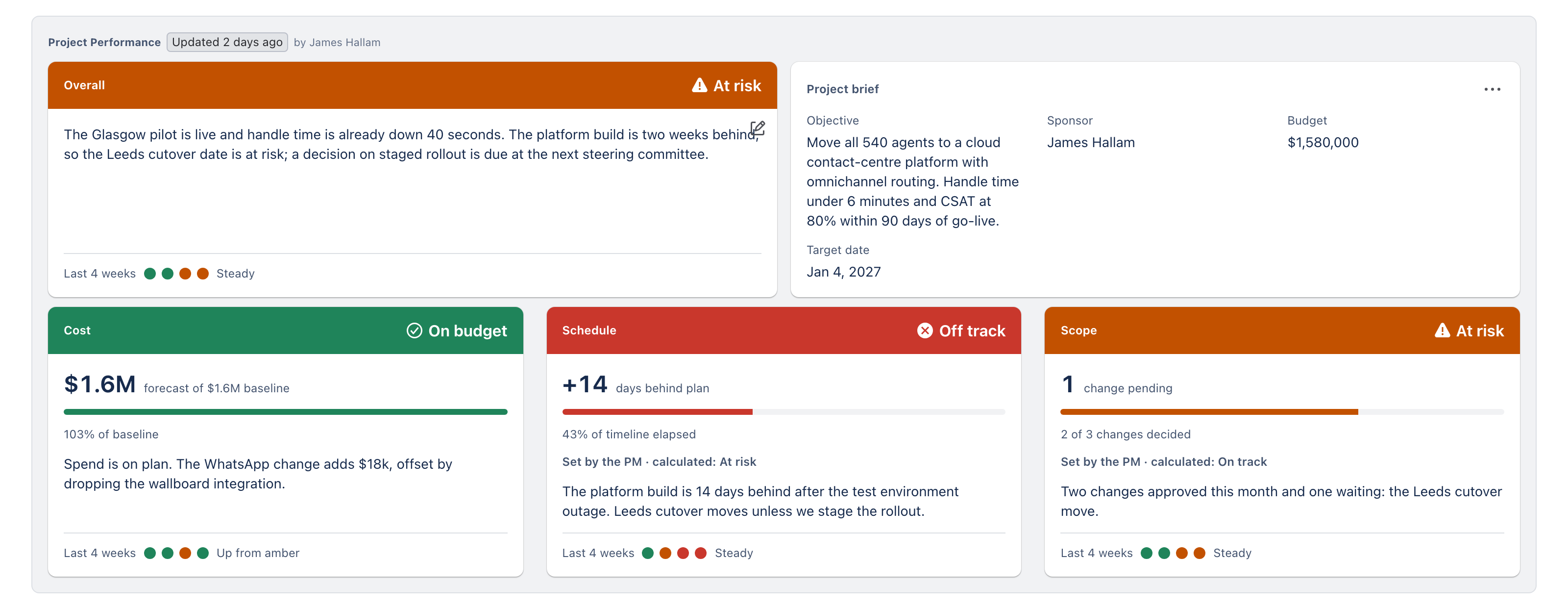
Tollgate holds the governance records in Jira, next to the work. Risks & Opportunities, Decisions, and Changes are registers with owners and status. Approvals of changes and decisions carry separation of duties, so whoever raises a change cannot sign it off. The decision log is append-only. The record of what you approved therefore outlasts the next restructure, however often the team reorganises. You update the registers through the week, and the dashboard is current when the meeting starts.

Tollgate Portfolio Health page: every programme's registers and status in one live view inside Jira

How the PMO works without Tollgate

Registers are scattered across Confluence, SharePoint, and email.

The deck is rebuilt from scratch every reporting cycle.

The same risk or decision has a different version in every file.

The audit trail exists only in your memory and your inbox.

How the PMO works with Tollgate

Each record type has one register, inside Jira.

The dashboard stays current, so there is no deck to rebuild.

The decision log is append-only and the business case is versioned.

The audit trail builds itself as decisions are recorded.

For delivery leads and Jira admins

How Tollgate installs alongside your existing Jira configuration

Tollgate adds no issue types or schema changes and asks nobody to re-key delivery data, so your Jira admin has nothing to reconfigure.

Many PPM tools need Jira restructured before they work: new parent levels, custom issue types, and workflows your team has to learn and route around. You usually say no. The restructure lands on your team.

Work packages are records inside Tollgate, which is a Forge app. Each work package links to your epics by key, so the sponsor sees work packages instead of a wall of tickets. Nobody re-enters delivery data. Delivery carries on underneath: stories split, sprints slip, and epics move. None of that changes the baseline the steering committee approved. The approved baseline stays fixed, and changes go through change control. A governance group you manage controls who sees Tollgate, and the data stays on Atlassian infrastructure with no Softwired server in the path. You approve the install once.

Tollgate Realisation view: the governance layer sitting above delivery without touching Jira configuration
Use case: regulated programs

Audit trail for regulated and public-sector programs

For regulated and government-adjacent programs, where an auditor can review a decision years after it was made.

An auditor of a regulated program asks what was approved, by whom, on what date, against which business case, and at what cost. Tollgate builds that record stage by stage as the program runs. The answer exists before the audit starts.

Append-only log and versioned case

The decision log is append-only, so every entry stays on the record. The business case is versioned, so you can show what justified the investment at each gate.

Separation of duties on approvals

Whoever raises a change or a decision cannot approve it. The workflow enforces that rule, so nobody has to police it.

Framing presets for assurance frameworks

Framing presets put the governance record in the terms of the assurance framework your program answers to, including Australian and UK public-sector investment frameworks.

Use case: mid-market teams

Investment governance for mid-market Jira teams without an enterprise PPM suite

For mid-market technology teams running multi-million-dollar programs on Jira who need investment governance without an enterprise PPM suite.

Many mid-market programs sit between a spreadsheet and an enterprise PPM platform. The spreadsheet cannot answer a steering committee’s follow-up questions from current data. An enterprise suite is a separate system to procure and administer alongside Jira. Tollgate is an app inside the Jira your team already runs, priced per user, and free for up to 10 users.

An investment moves through three acts in Tollgate: Commit, Run, and Realise. You set the thesis and the business case, run the program through gate approvals while the registers keep the record, and finish by recording the return you expected next to the return you got.

Commit

Discovery and Approval: the thesis, the business case, and the funding decision.

Run

Initiation and Delivery: work packages, risks and opportunities, decisions, and changes.

Realise

Close-out and Benefits Realisation: the return expected next to the return realised.

Bring a real investment to a 30-minute demo

We’ll show you where that investment sits in Tollgate and how your next steering committee runs from the dashboard instead of a deck.